
REVENUE DRIVEN FOR OUR CLIENTS

Understanding 5xx Server Errors and How They Can Be Fixed

Cover image for guide on 5xx server errors, explaining causes, fixes, and website downtime troubleshooting

Imagine an e-commerce website crashing during peak sales hours. Customers see messages such as “transactions failed” and “server errors”. Basically, your website is throwing a “digital tantrum.” That can lead the business to take a hit to its trustworthiness. Surviving a reputation hit that comes with customer inconvenience because of website downtime can be difficult to navigate. To minimize downtime, most businesses turn to third-party providers to build and manage their websites efficiently. Because server error troubleshooting requires a solid understanding of the issues that cause them. In this article, you will learn everything about 5xx server errors, what they are, why they happen, and how to prevent your website from throwing a “public hissy fit”.

5xx Errors: What Are They?

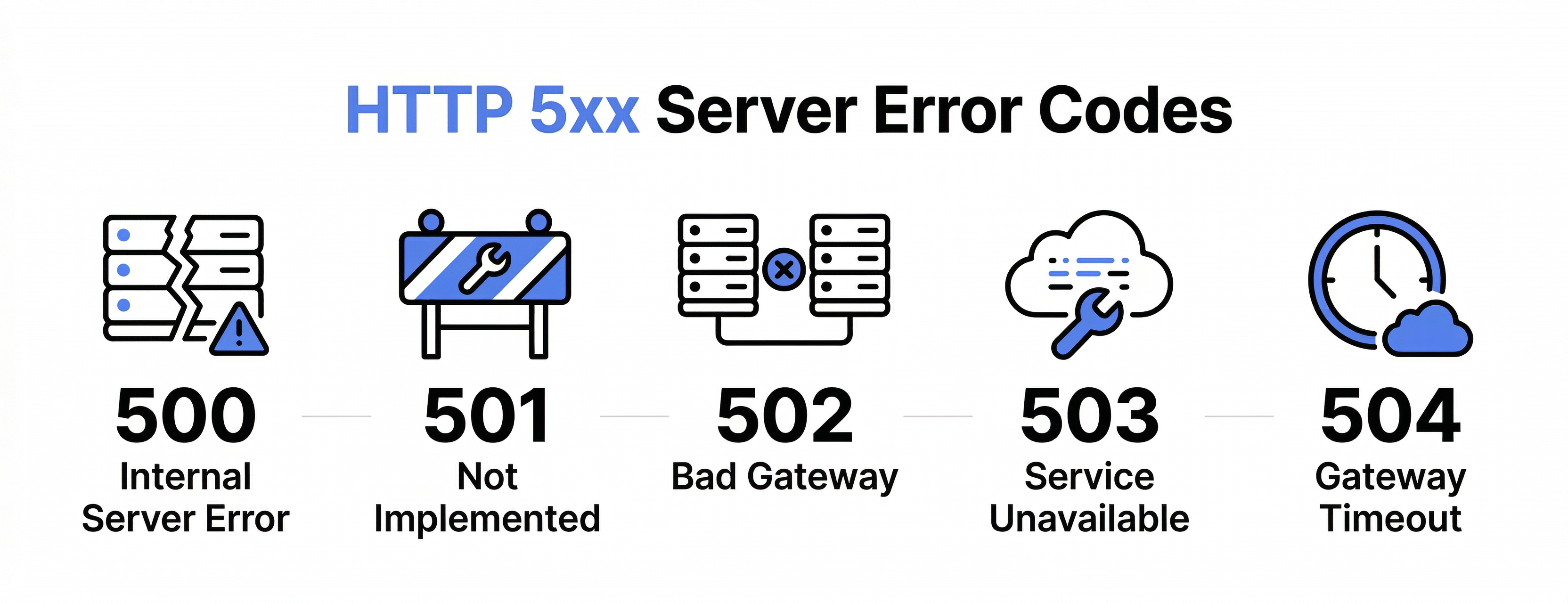
In the simplest of terms, the Hypertext Transfer Protocol (HTTP) is basically the backbone of communication across digital networks, aka the internet. The 5xx errors are returned from HTTP, usually in the form of 500 or 503, meaning that the server failed to serve the client’s request. So, meaning the customer did everything right from their end, but the server of your website failed to deliver on it. These errors always show up with the number 5 and then the following numbers, which highlight the specific problem. Here is the quick rundown of 5xx errors and what they mean:

HTTP 5xx server error codes infographic showing 500, 502, 503, and related server errors.
  • 500—Internal Server Error: The server encountered an unexpected problem that prevented it from fulfilling the request.
  • 501—Not Implemented: The server doesn’t support the requested functionality or method.
  • 502—Bad Gateway: A proxy or gateway received an invalid response from an upstream server.
  • 503—Service Unavailable: The server is temporarily unable to handle the request, often due to maintenance or high load.
  • 504—Gateway Timeout: An upstream server took too long to respond to a proxy request.
  • 505—HTTP Version Not Supported: The server doesn’t support the HTTP version used in the request.
  • 506—Variant Also Negotiates: A server configuration error occurred during content negotiation for multiple resource variants.
  • 507—Insufficient Storage: The server cannot store the data needed to complete the request, often due to resource limits.
  • 508—Loop Detected: The server detected an infinite loop while processing a WebDAV request.
  • 509—Bandwidth Limit Exceeded: The request exceeded the server’s defined bandwidth limit.
  • 510—Not Extended: The request didn’t meet the server’s access policy; additional information is required.
  • 511—Network Authentication Required: Access to the resource requires the client to authenticate first.

As you can see above, each of these errors serves a specific purpose. The numerical codes help your support team quickly identify the underlying issue, allowing them to take the appropriate server-side actions.

What Causes 5xx Server Errors

The reason why 5xx server errors occur is that something breaks on the side of the server. So before the server even has the time to deliver a response, a malfunction happens, resulting in website performance issues. These issues usually fall into these categories:

Application Problems

Things like unhandled code exceptions can break your website’s ability to process requests. Then, crashed services such as interrupted API’s and database connection failures and memory leaks are also common triggers for 5xx errors. If the server error troubleshooting isn’t done on time, these errors can result in website downtime, hence resulting in customer dissatisfaction because nothing says “great user experience” like a checkout page that suddenly decides to disappear.

Resource Limitations

Things like unhandled code exceptions can break your website’s ability to process requests. Then, crashed services such as interrupted API’s and database connection failures and memory leaks are also common triggers for 5xx errors. If the server error troubleshooting isn’t done on time, these errors can result in website downtime, hence resulting in customer dissatisfaction because nothing says “great user experience” like a checkout page that suddenly decides to disappear.

Configuration Mistakes

Configuration mistakes are more common than most business owners realize. Load balancers combined with expired SSL certificates or timeout settings can sabotage your website’s reliability. These small setup errors can block your traffic and, if left unchecked, can snowball the 5xx errors. So even a tiny setting can cause major issues for your customers.

Catching and Fixing 5xx Errors

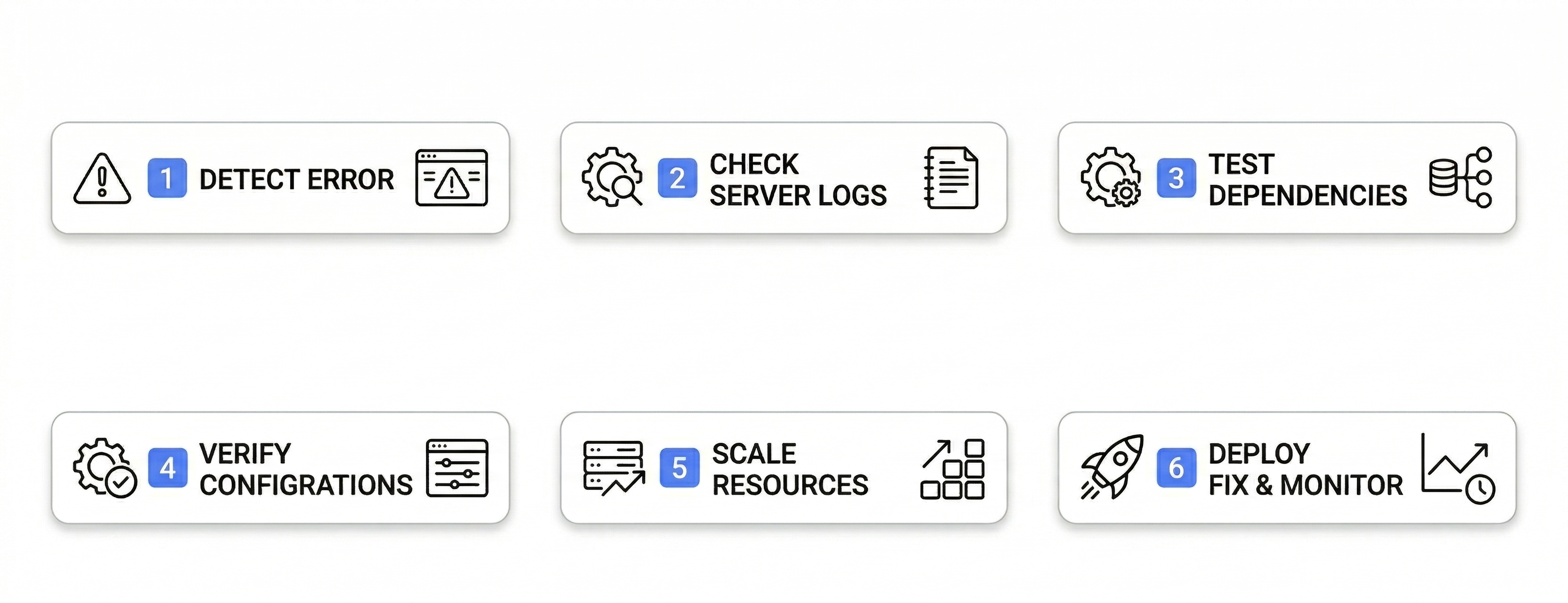
Finding 5xx errors can be done incredibly fast through monitoring systems that can alert you to HTTP 5xx error codes before they become a major pain in your ops. If you don’t have a full observability platform for server maintenance, you can spot these errors using tools that track server performance, monitor user experience, or analyze search engine interactions. Your server logs can also show you a detailed view of HTTP errors that affect URLs and server state. Once you have figured out what kind of 5xx error is causing your website performance issues, you can address it using the following systematic approaches:

Flowchart showing steps to detect and fix 5xx server errors, including logs, configs, and scaling.

Review Recent Updates

Most 5xx errors appear after updates to the server. Look at the deployment logs and the configuration edits to make sure that the system updates from the past 24 hours aren’t causing the problem. Sometimes, rolling back on a recent update can help you immediately restore your normal operation.

Inspect Error Logs

Your application logs will always contain critical information about what’s wrong. Pay attention to the recurring patterns, which can include failing URLs and specific times when the errors occur. Just like the server logs, application logs can ensure you have the complete picture because if you ignore them, they’ll happily let the same error surprise you again tomorrow.

Test Dependencies

Most applications rely on other services and external integrations. So if the dependency itself ends up failing, then HTTP errors are a natural occurrence. Preventing such issues is easy if you ensure proper communication of these dependencies, resulting in improved system reliability.

Verify Configurations

Misconfigurations are common, be it a tiny setting you overlooked, something slipping the eye, or just that moment of confidence where you thought “this is fine”. There are so many things to look out for: web server settings, application configurations, environment variables, file permissions, SSL certificates, and timeout limits.

Scale Resources Appropriately

During high traffic periods, 503 errors can occur quite frequently, meaning you might need additional resources. Properly scaling resources, like upgrading your server capacity, will make server maintenance easy, and you can implement auto scaling to handle spikes as well.

Set Up Alerts

For future prevention, set up an alert system to catch problems early on. You can set up different types of alerts from resource usage to error rates. Being proactive in detecting issues allows a business to be time-efficient and save itself from the embarrassment of website downtime.

Closing Thoughts

Whether you are running a small business or a massive enterprise, prioritizing user experience is essential to maintaining your customers’ trust. It takes more than just fixing these errors; understanding their fundamentals and why they are caused ensures stronger prevention in the future. Do not be overwhelmed by these errors; in fact, each 5xx error is an opportunity to make your system more reliable. So in the future, your customers don’t walk away feeling like you just “ghosted” them. Learn more about how Corecentrix Business Solutions can help you optimize your websites and online presence.

1,345,948+

LEADS DRIVEN
FOR CLIENTS

$12,482,491+

REVENUE
GENERATED

1000+

EXPPERTS ALL OVER THE STATES

500+

ON-GROUND
STAFF

Discover how we can help your business grow

SITE PROPOSAL

We are a full service marketing & development company, working all over USA with top businesses.

80 Orville Drive, Suite 100, Bohemia, NY, 11716